


Temperature is a setting that controls how random an AI model’s output is. At a low temperature the model almost always picks the most likely next word. At a high temperature it takes more chances on less likely words.
The same prompt at different temperatures can give a dull but safe answer or a creative but less reliable one.
How temperature works
A language model writes one token at a time. For each step it scores every possible next token. Temperature reshapes those scores before the model picks one.
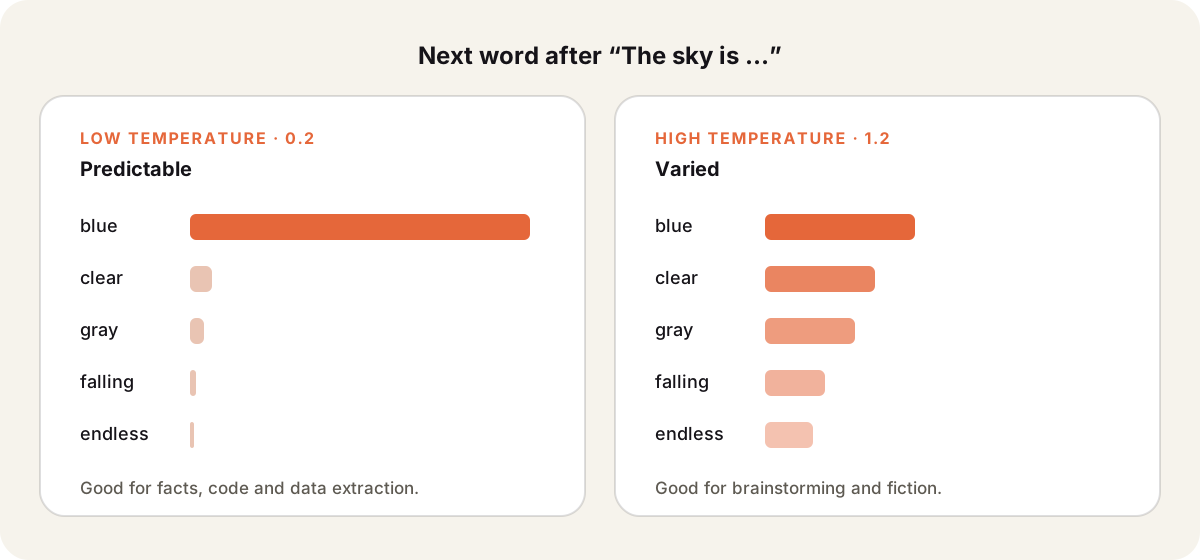
- Low temperature makes the top choice even more likely. Output is consistent and repeatable.
- High temperature flattens the scores. Unusual words get picked more often, so output varies between runs.
- Temperature 0 comes close to always picking the top token. Even then, answers aren’t always identical across runs.
Which value to use
| Task | Temperature | Why |
|---|---|---|
| Data extraction, code | Low (0 to 0.3) | You want the same correct answer every time |
| Q&A, summaries | Medium (0.3 to 0.7) | Clear but natural wording |
| Brainstorming, fiction | High (0.8 and up) | More variety and surprise |
Ranges differ by provider. OpenAI’s API accepts 0 to 2. Anthropic’s accepts 0 to 1. Some newer reasoning models fix the value and ignore the setting.
Higher temperature does not make a model smarter or more creative in a deep sense. It only adds randomness. Very high values produce nonsense and raise the risk of AI hallucination.
Temperature in chat apps
Most chat apps, including ChatGPT, Claude and Sparkian, don’t show a temperature slider. They use defaults chosen for each model. You control temperature directly only through an API.
In a chat app you can get the same effect in other ways.
- For more variety, regenerate the answer or compare several models with multi-model chat.
- For more consistency, give exact rules and an example in a system prompt.