


A system prompt is a set of instructions the AI model reads before it sees your messages. It tells the model who it is, how to respond and what rules to follow. Every reply in the conversation follows it.
Your regular messages are user prompts. They ask for something specific. The system prompt sets the ground rules that apply to all of them.
System prompt vs user prompt
| System prompt | User prompt | |
|---|---|---|
| Written by | The app or you, once | You, every turn |
| Scope | The whole conversation | One request |
| Typical content | Role, tone, format, limits | The question or task |
| Example | “Answer as a support agent. Keep replies short.” | “A customer wants to return boots after 40 days.” |
A good system prompt
A useful system prompt is short and specific. It covers four things.
- Role. Who the model is acting as.
- Audience. Who it is writing for.
- Format. Length, structure and tone.
- Rules. What it must or must not do.
Here is the one I typed into a new Sparkian project.
You answer customer emails for a hiking gear store.
Keep replies under 120 words and friendly.
Never promise a refund. Link to the returns page instead.
Every line can be checked in the output. Vague lines like “be helpful” add nothing, because the model already tries to be helpful.
Project instructions in Sparkian
In Sparkian a project’s Instructions field works as a system prompt for every chat in that project. It holds up to 5,000 characters.
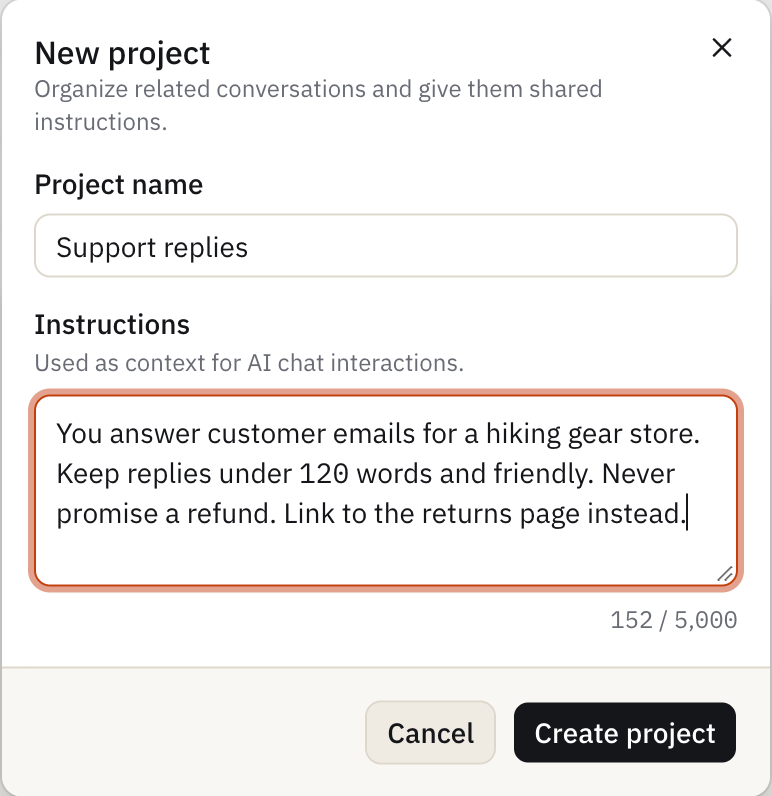
You set it once, and every chat in the project follows it. Teammates in the project get the same behavior without copying the prompt.
Common mistakes
- Too long. Pages of rules make the model miss the important ones.
- Conflicting rules like “Be detailed” and “keep it short” in the same prompt.
- A system prompt is not a safe place for passwords or keys. Prompt injection can expose it.
- Try a few tricky messages and check that each rule holds.