


An AI browser is a web browser with an AI assistant built in. It can summarize the page you are on, answer questions across open tabs and, in agent mode, click, type and fill in forms for you.
A normal browser shows pages. An AI browser can also read them and act on them.
Three kinds of AI browser
The term covers three different designs.
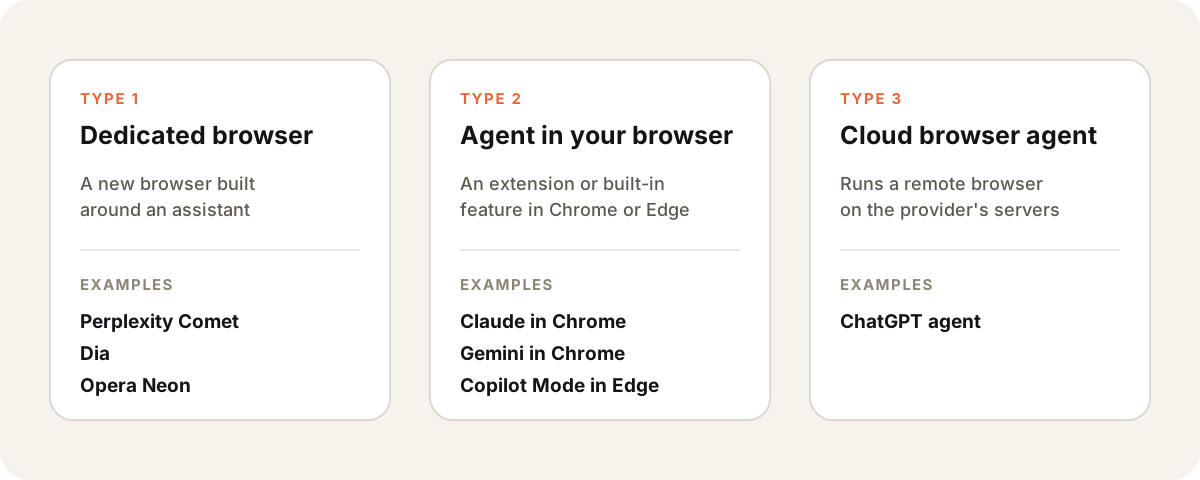
| Kind | Where the agent runs | Uses your logins |
|---|---|---|
| Dedicated AI browser | A new browser you install | Yes |
| Agent in your browser | An extension or feature in Chrome or Edge | Yes |
| Cloud browser agent | A remote browser on the provider’s servers | Only what you give it |
This space changes fast. OpenAI launched its ChatGPT Atlas browser in October 2025 and retired it on 9 August 2026. Its browsing features moved into the ChatGPT app.
What an AI browser can do
- Summarize a long article, thread or PDF in the current tab.
- Answer questions about the page, or compare several open tabs.
- Search and research across sites and collect sources.
- Act as an AI agent. Fill forms, add items to a cart or book a slot after you approve.
The agent features are the real change. They turn the browser from something you drive into something that can run errands.
Risks to know
An AI browser sees what you see, including signed-in accounts. That makes it useful and risky.
- Prompt injection. Hidden text on a page can try to give the agent instructions. A careful agent treats page content as data, not commands.
- Access to accounts. An agent in your logged-in browser can act as you. Keep it away from banking and admin pages unless you watch every step.
- Privacy. Page content may be sent to the AI provider to process. Check the provider’s data policy.
- Mistakes. Agents still misclick and misread. Review anything that sends, buys or deletes.
AI browser vs AI chat app
An AI browser works on the web pages in front of you. An AI chat app such as Sparkian works on your prompts, files and projects. It reads a web page when you ask with URL read or web search.
Many people use both. The browser handles tasks on websites. The chat app handles writing, analysis and comparing models with multi-model chat.